

To see which apps are connected to your bank account, check three places: your bank’s connected-apps page, Plaid Portal, and the app itself. Which list an app shows up on depends on how it connected, and some connections show up on none of them.
This post covers how to tell the connection types apart, where to look at the major US and Canadian banks, how to use Plaid Portal, and what revoking access does and doesn’t do.
Two ways apps connect to your bank
When you link a bank account to a budgeting app, payment app or tax tool, one of two things happens.
You sign in on your bank’s own page
The app sends you to your bank, you sign in there, and you approve what to share. The app never sees your password. It gets a token from your bank instead, and your bank keeps a record of the connection. This is the kind your bank can list and let you revoke. Chase, for example, says an app linked this way “will never see your Chase username or password.”
You type your bank username and password into the app
The app, or a data company working for it, stores your login and signs in as you to collect your data. Your bank may have no record that the app exists, because as far as the bank can tell, it’s you signing in.
Through a company like Plaid
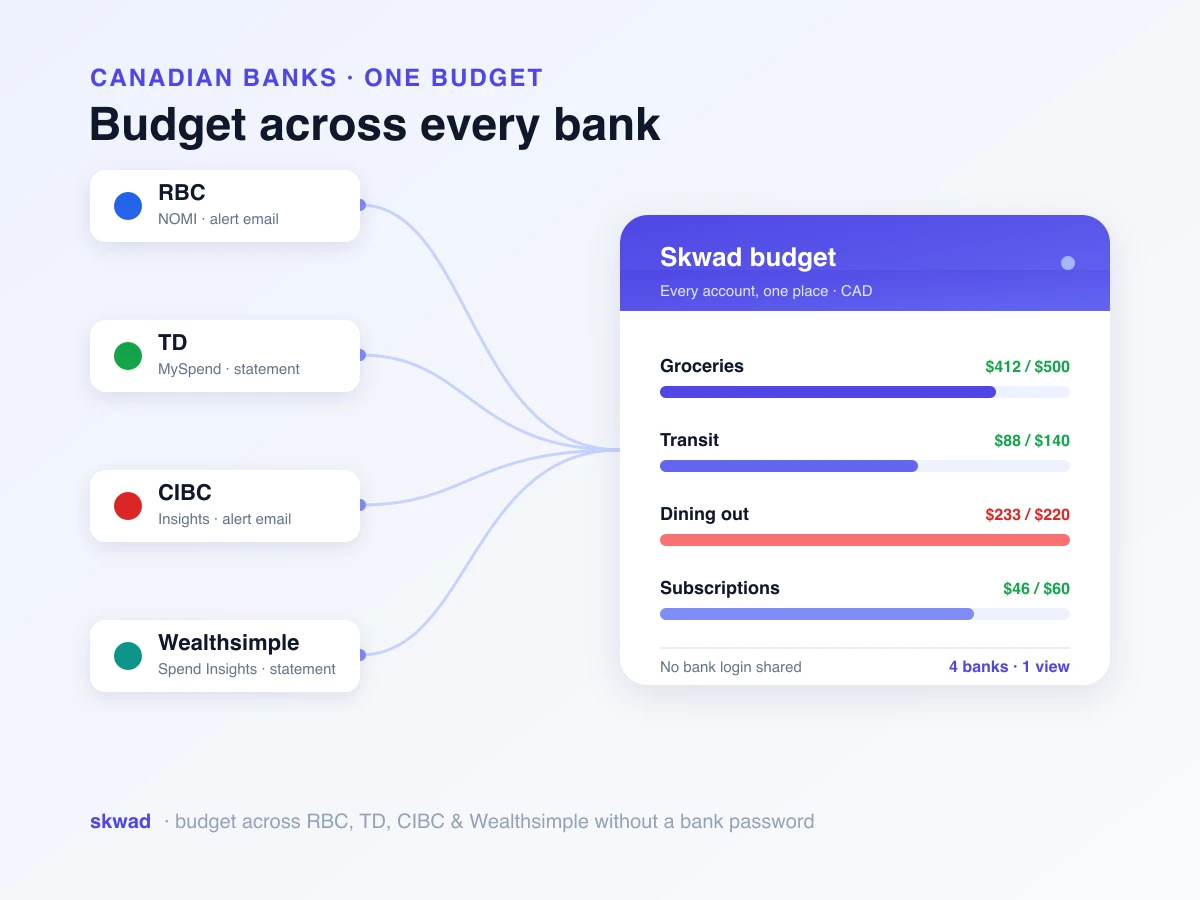
Many apps use a company like Plaid in the middle. Plaid handles the bank connection for the app and keeps its own record of the apps you’ve connected. Here’s how a Plaid bank connection works in Skwad.
| How the app connected | Shows in your bank’s list | Shows in Plaid Portal | How to cut it off |
|---|---|---|---|
| Your bank’s sign-in page | Yes | If Plaid handled it | Revoke at your bank or in Plaid Portal |
| Your username and password, typed into the app | Usually not | If Plaid handled it | Remove it in the app, then change your bank password |
| Through Plaid, either way | Depends on the method | Yes | Disconnect in Plaid Portal |
If you aren’t sure which method an app used, assume the worst for anything you connected years ago, when typing your password was more common.
Check your bank’s connected-apps page
Each bank names this page differently. Here’s where the major banks document it, checked against their own help pages in November 2026.
Chase
Chase lists connections under Linked apps in the Security & Privacy Center on chase.com and in the Chase Mobile app. It shows which of your accounts each app can access, and you can remove access at any time. Chase describes how linking works: you choose which accounts to share, so you can share checking without sharing savings.
In September 2026 Chase began rolling out a Data Security Center in the Chase Mobile app, where you can review connected apps, change permissions, adjust how long an app can access your data, pick which accounts are linked, and unlink an app.
Bank of America
Bank of America shows the third-party services that use its secure data-sharing connection in Online Banking and the mobile app, and lets you revoke any of them at any time. Its third-party data-sharing page also covers apps that used your login instead: you can try removing access in the app, but Bank of America says the safest way is to change your password.
Capital One
Capital One’s data-sharing terms say you can revoke an app’s ongoing access at any time on the Capital One website, and that a revoked authorization may take time to take effect.
Wells Fargo
Wells Fargo’s data-sharing terms say you can revoke your authorization by telling Wells Fargo the name of the company and the accounts you want to stop sharing. Remove the connection inside the app as well.
TD (Canada)
TD documents it step by step for EasyWeb:
- Sign in to EasyWeb and select My Profile & Settings in the left-hand menu.
- Under Account Data Sharing, select View all. The Your Account Data Sharing page lists every financial service with access to your TD accounts.
- Tap the Delete icon next to an app, or tap its name and choose Revoke Authorization.
Scotiabank
In Scotiabank online banking, go to Profile Settings, then Security and Privacy, then Manage Data Settings. The page lists the service providers you’ve authorized to receive your data, going back up to two years. You can remove individual accounts from an authorization or cancel it entirely.
CIBC
CIBC’s guidance is to revoke consent from inside the app: open the app’s settings and manage its linked accounts. If you can’t find the setting, contact the app, and change your CIBC password.
RBC
As of October 2026, RBC blocks third-party personal AI agents from signing in to RBC online banking. For other apps, revoke from the app or Plaid Portal and change your password if the app ever had it.
Other banks
Search your bank’s help centre for “connected apps”, “linked apps”, “third-party access” or “data sharing”. If you can’t find a page, revoke from the app and Plaid Portal, change your password, and ask your bank whether any third parties still have access.
Check Plaid Portal
Plaid handles bank connections for a lot of apps, so it’s worth checking even if you don’t remember using it. Plaid Portal, at my.plaid.com, is Plaid’s site for the people whose accounts it connects.
In Plaid Portal you can:
- see the apps you’ve connected through Plaid
- see the types of data shared with each app
- disconnect an app from your bank accounts
- delete data stored in Plaid’s systems
To disconnect an app, follow Plaid’s steps:
- Sign in to Plaid Portal and open the Overview tab.
- Select the app you want to manage.
- Scroll to Manage connections and select Disconnect app.
- Choose the bank and confirm with Disconnect.
Plaid says disconnecting stops future data sharing only. The app may keep what it already collected.
Plaid isn’t the only company that does this. If an app used a different data provider, it won’t appear in Plaid Portal, which is another reason to check the app itself.
Check the app itself
Every app that pulls bank data has a place to remove a connection, usually called Connections, Linked accounts or Accounts in its settings. Remove the bank there, then delete the app or close your account if you’re done with it.
Removing the connection stops new data. To delete what the app already has, use its account deletion or privacy request option, or contact its support. Most privacy policies say how.
If you’re cleaning up because of a connection that keeps breaking, remove the old connection before linking again, so you don’t end up with duplicates.
If an app ever had your bank password
Change your bank password. It’s the only step that cuts off an app that signs in as you, whether or not your bank lists it. Bank of America and CIBC both give this advice.
Some bank agreements forbid sharing your login in the first place, and if a shared password leads to fraud, the loss can land on you. We cover that in is it safe to connect your bank account to a budgeting app. After changing it, turn on your bank’s transaction alerts so you see any charge you don’t recognize.
What revoking does and doesn’t do
| Action | Stops new data | Deletes data already shared | Cuts off password-based access |
|---|---|---|---|
| Revoke at your bank | Yes, for connections made on your bank’s page | No | No |
| Disconnect in Plaid Portal | Yes, for apps connected through Plaid | No (you can delete Plaid’s copy separately) | Yes, for that Plaid connection |
| Remove in the app | Yes | Only if you also delete your account or request it | Usually |
| Change your bank password | Only for password-based access | No | Yes |
For a full cleanup, do all four: revoke at the bank, disconnect in Plaid Portal, remove and delete in the app, and change your password if the app ever had it.
When to check
When you stop using an app
Deleting an app from your phone doesn’t disconnect it. The connection keeps running until you revoke it, so remove it at the bank and in Plaid Portal before you delete the app.
Once a year
Make it part of the same yearly review as your subscriptions. Look at your bank’s list and Plaid Portal side by side and revoke anything you don’t recognize or haven’t opened in months.
After a breach notice
If an app or data company you’ve used reports a breach, revoke its access, change your bank password, and watch your transactions for a few weeks.
On shared accounts
On a joint account, each person may have connected their own apps. Check together, since an app one of you connected can still see the shared account.
Apps you don’t need to connect at all
The simplest connection to manage is the one that never happens. Skwad can track your spending from the transaction alerts your bank already emails you, so no app ever holds your bank login or a token from your bank. More on budgeting without sharing your bank password. If you do link a bank through Plaid in Skwad, you can manage that connection in Plaid Portal like any other.
The same thinking applies to AI. If you want ChatGPT or Claude to answer questions about your spending, connect them to Skwad instead of your bank: Skwad lists every connected AI app with when it last used your data, lets you revoke it in one click, and switches off connections that go 30 days unused.
Troubleshooting
An app isn’t in my bank’s list
It probably connected with your username and password, or through a data provider your bank doesn’t list. Check Plaid Portal, remove the connection in the app, and change your bank password.
Plaid Portal shows nothing
The app may have used a different data provider, or Plaid may not have matched the connection to your Plaid Portal account. Check the app’s settings instead.
I revoked access but the app still shows my transactions
That’s data it collected before you revoked. Revoking stops new data. Ask the app to delete your account and data.
The app asks me to reconnect
That’s the revocation working. Ignore the prompt if you meant to cut it off, or delete the app.
Frequently asked questions
How do I see what apps are connected to my bank account?
Check three places: your bank’s connected-apps or data-sharing page in online or mobile banking, Plaid Portal at my.plaid.com for anything connected through Plaid, and the settings of each app you’ve used. If you ever typed your bank password into an app, change it, because that kind of connection may not appear in your bank’s list.
How do I remove an app’s access to my bank account?
Revoke it on your bank’s connected-apps page, disconnect it in Plaid Portal, and remove the bank connection inside the app. If the app ever had your bank password, change your password too.
Does disconnecting an app delete my data?
No. Disconnecting stops future sharing. Plaid’s help center says the app may keep data it already collected; to delete it, contact the app.
Why isn’t an app showing in my bank’s list?
Banks list apps that connected through their own sign-in page. An app that connected with your username and password, or through an aggregator your bank doesn’t list, may not appear. Remove it in the app and change your bank password.
What is Plaid Portal?
Plaid’s site for people whose bank accounts are connected to apps through Plaid. It shows the apps you’ve connected, the types of data each one receives, and lets you disconnect apps and delete data stored in Plaid’s systems.
Should I change my bank password after removing an app?
Yes, if you ever typed your bank username and password into that app or its sign-in window. Bank of America calls changing your password the safest way to cut off an app that used your login, and CIBC gives the same advice.
How often should I check connected apps?
Once a year, whenever you stop using an app, and after any breach notice from an app or service you’ve connected.
Knowing who can see your money is the first step to deciding who should. Start with your bank’s list and Plaid Portal, and revoke anything you don’t use.