
Connecting your bank account to a budgeting app is only as safe as the way the app connects. If the app asks for your online banking username and password, it’s risky: some bank agreements forbid sharing them, and banks such as CIBC and RBC leave you on the hook for losses if you do.
Below are the three risks of handing over your login, how third-party bank connections store it, and the alternative we built Skwad around.
Why handing over your bank login is risky
We understand the pull. Type one login and every transaction shows up by itself. Bank agreements like CIBC’s tell you to keep that password to yourself, though. Three things follow:
1. Breaching bank security protocols
When you opened the account, you agreed to keep your login private. Every sign-in check your bank runs assumes you kept that promise.
Give your password to a budgeting app and you’ve stepped around those checks. Anyone who gets into that app, or into the company it uses to fetch your data, now has a way into your account.
2. Risk of credentials being compromised
You might trust the app. You still can’t see how it stores your password, or how its data aggregator does. A breach, a hack or one bad employee is enough to leak it.
Agreements like CIBC’s and RBC’s put those losses on you. CIBC’s electronic access agreement makes you responsible for losses when an aggregation service you authorized uses your password, and RBC’s says the bank won’t be responsible for losses that result from sharing it. If the app leaks it, you’d likely have no way to get that money back, and the losses could be large.
3. Your bank’s terms may forbid sharing your password
Pull up your bank’s user agreement. CIBC’s, for one, says you won’t disclose your password to anyone. Some banks, RBC among them, let you share it with an aggregator but leave any losses with you.
So if fraud, identity theft or unauthorized transactions hit your account after you’ve shared it, your bank can refuse responsibility. The loss is yours, because you shared the login.
A few banks support OAuth. You sign in on the bank’s own page, so the app never holds your plain-text password. Where a bank doesn’t offer that, the data aggregator keeps your password on file to refresh your data later.
Start your free 15-day trial
Get startedThe safer alternative: bank alerts
Most banks already email you real-time alerts for many money movements:
- Direct deposits, like your pay
- Transfers and credits coming in
- Card payments, debit or credit
- Subscriptions, bills and other recurring charges
- Refunds and account adjustments
Bank alerts are only one of the Plaid alternatives Skwad supports. You can also use SimpleFIN, statement scanning or a CSV import, or link your bank directly if you decide you want to.
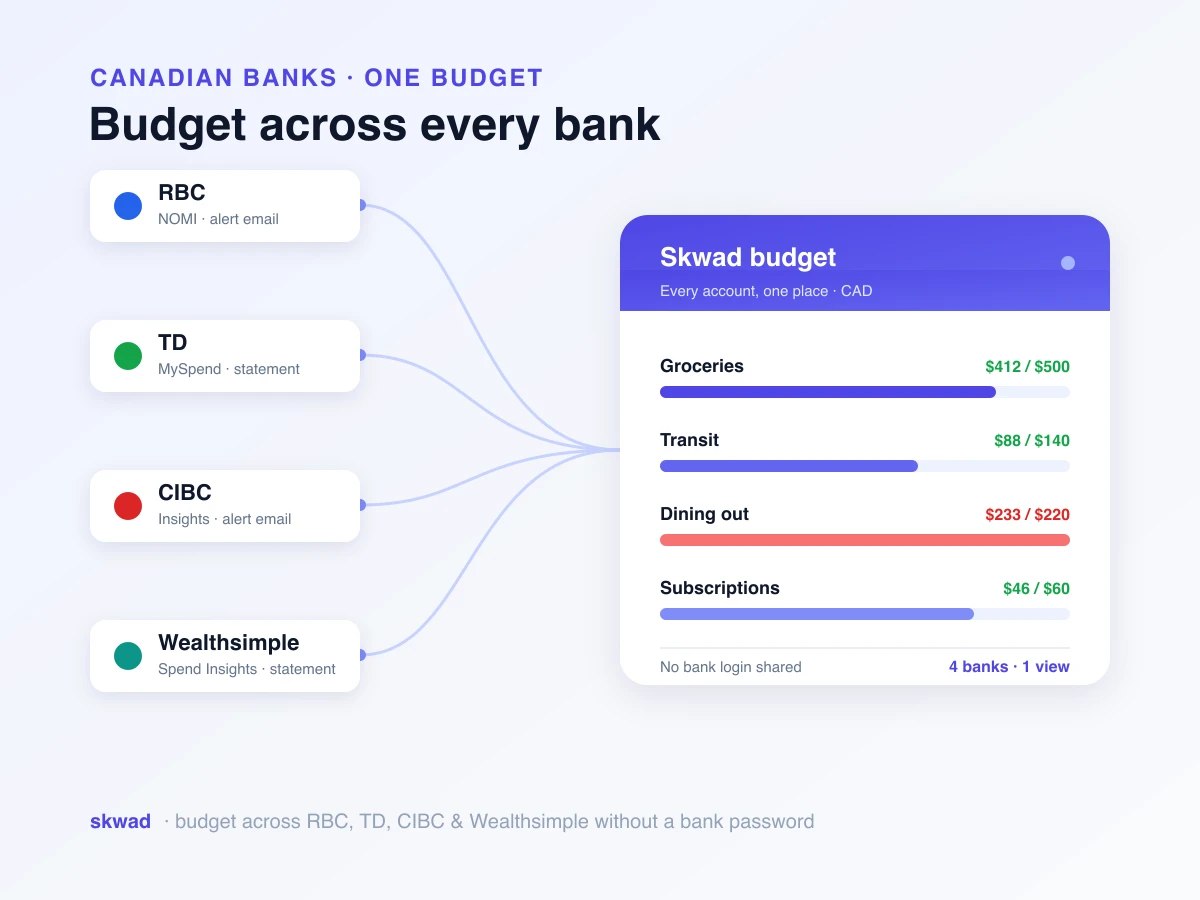
Instead of logging into your accounts, Skwad watches your email for these alerts from your banks and card providers. Tap your card at Shoppers Drug Mart, the alert arrives, and Skwad reads it and files the charge under a category. Those email alerts become one real-time feed, and no third party ever sees your login. It’s the same idea behind tracking spending without linking your bank. Your bank connections and personal information stay 100% private and secure.

Skwad: a safer alternative to traditional budgeting apps
That’s the risk of handing your bank login to an app. We built Skwad to work without it, and we put your security and privacy first.
How Skwad works
Skwad builds a full view of your finances from the bank alerts and email notifications you already get. It never needs access to your bank accounts. Here’s the flow:
-
Email forwarding: Point your bank and credit card alerts at your own Skwad email address.
-
AI-powered parsing: Skwad reads the email and finds the merchant, the amount and the date.
-
Automatic categorization: The alert says Loblaws, so the charge lands in Groceries.
-
Real-time updates: New alert in, dashboard updated.
The benefits of using Skwad
No bank login by default. So there’s no password sitting on someone else’s servers, waiting for a breach. You’re not breaking your bank’s terms of service either, and the fraud protection and liability coverage your bank offers still apply to you. Skwad only sees the alerts you forward. You choose what gets shared. Almost any bank or card provider that emails transaction alerts works (here’s a list of the most popular banks people use with Skwad). Updates arrive in real time, same as a bank-linked budgeting app, minus the password risk.
Making the switch to Skwad
Switching takes three steps:
- Sign up for a Skwad account.
- Set up forwarding for your bank and credit card alerts to your Skwad address.
- Leave the rest to Skwad. It sorts what comes in and keeps your dashboard current.
That’s a full money manager, and nobody holds your banking login. No worry about where your password ended up. Your data stays private, and you stay inside your bank’s terms.
Breaches and privacy scares keep getting more common. Whatever you trust with your money should put security first, and we built Skwad so you can stay on top of your finances without breaking your bank’s rules.
Typing your bank password into an app is like leaving it on a sticky note for anyone to find. It’s only as safe as every app and API it passes through.
Alerts give you the whole picture minus that risk. Your money stays private and in your hands. If you’d rather never type a password into a third-party app at all, here’s how to budget without sharing your bank password.
Want a budgeting app that skips Plaid entirely? See why Skwad is a top budget app that works without bank linking.
Frequently asked questions
Is it safe to connect your bank account to a budgeting app?
It depends on how the app connects. If an app asks for your online banking username and password, that’s a real risk: some bank agreements forbid sharing them, and banks such as CIBC and RBC say losses that follow are yours to cover. Skwad avoids this by reading the transaction alerts your bank already emails you, so your login never leaves your bank.
Does sharing my bank password void my fraud protection?
Often, yes. CIBC’s and RBC’s online banking agreements both leave losses that follow from sharing your login with an aggregator to you. If a budgeting app leaks those credentials, you may have no way to recover the money.
Is read-only access from a budgeting app safe?
Not by itself. Read-only access still means the app or its data aggregator stores your credentials so it can refresh your data, and stored credentials can leak in a breach or be misused. Skwad never stores bank credentials, because it works from email alerts you choose to forward.
How does Skwad track transactions without my bank login?
Skwad watches a private email address for the transaction and balance alerts your bank already sends. It pulls the merchant, date and amount from each alert, categorizes the transaction and updates your dashboard in real time. It never asks for your bank password.