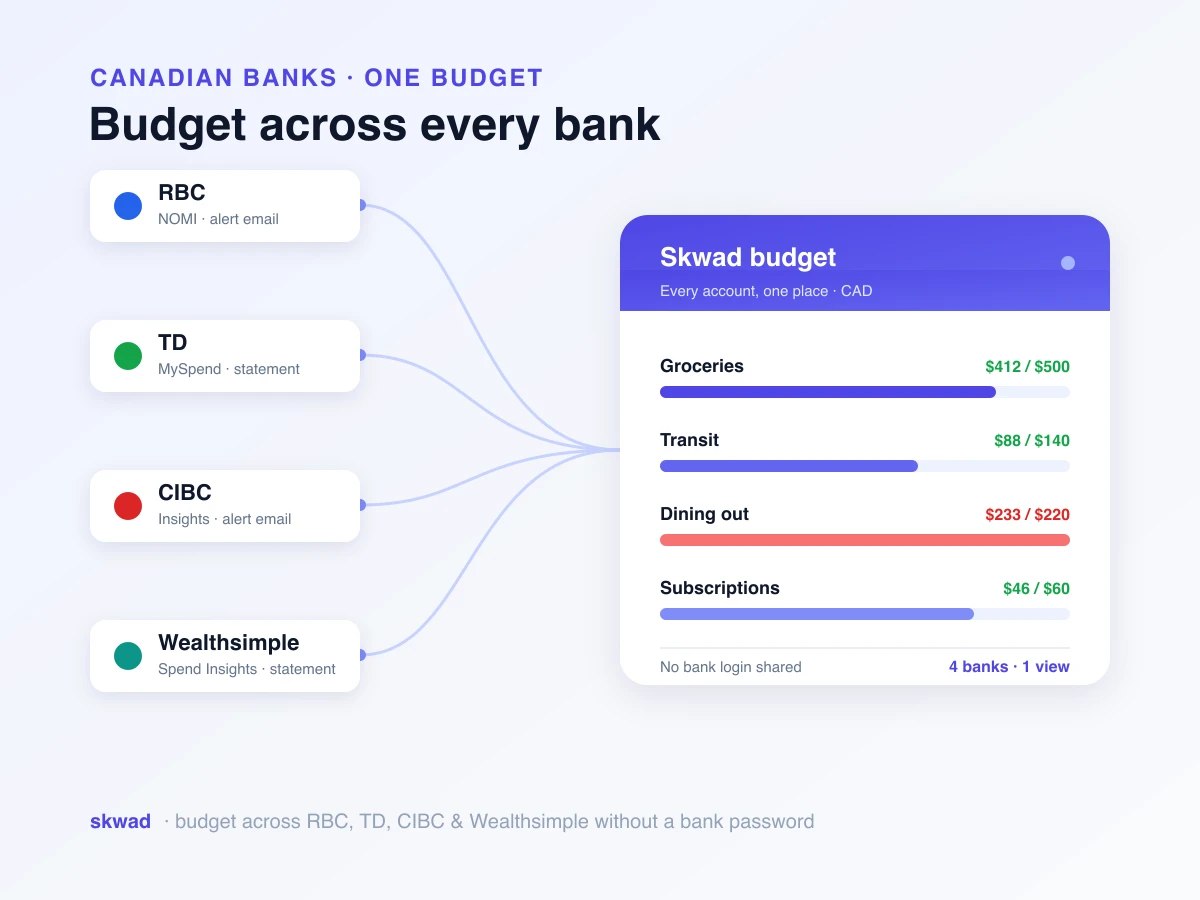


Skwad is a budget app that works without linking your bank account. Instead of asking for your bank login through Plaid, it reads the transaction alerts your bank already emails you, and you fill any gaps with statement uploads or manual entry.
Skwad then sorts each transaction into a category and updates your budget. We built it that way on purpose. Typing your bank password into an app you installed five minutes ago should feel wrong, and if it does, you’re being careful, not paranoid. Below: why people skip bank linking, how Skwad gets your transactions without it, and how manual tracking stacks up against linked accounts.
Why choose an app that doesn’t use Plaid
Plaid is the pipe between your bank and thousands of finance apps. Most people never notice it’s there. Connect through it, though, and you usually hand over more than last week’s purchases. Your full transaction history can go along for the ride, plus balances on every linked account and identifying details. That’s often broader than what you meant to share.
Bigger doesn’t mean safer, either. A big data company is a bigger target. The Equifax breach exposed the data of 147 million people, and size didn’t stop it. In 2020, Plaid settled a class-action lawsuit for $58 million over allegations that it collected more financial data than it needed and captured bank logins through its own interface.

Many reasons are more ordinary than a breach:
- You don’t want to share bank credentials with an app you downloaded this morning.
- Bank linking can break your bank’s terms of service, and that may put the liability on you if something goes wrong. For the full trade-off, see is it safe to connect your bank account to a budgeting app.
- Your money is spread out: cash, a couple of cards, side income, or accounts aggregators handle badly.
- You want to decide what gets tracked, rather than having every transaction pulled in for you.
Skwad leaves you in charge of what comes in and when, and your login details stay with your bank. For a fuller rundown of the Plaid alternatives Skwad supports, from bank alerts to SimpleFIN to CSV, see our no-Plaid guide.
How Skwad budgets without your bank login
Getting transactions in is the one job that usually needs a bank link. Skwad has three ways around it. Use one, or all three.
Bank email alerts. Turn on transaction alerts at your bank and most will email you about every purchase. Many send balance alerts too. Let those land in your inbox, then auto-forward them to your private Skwad scan address. We pull out the amount, merchant, and date, and the transaction appears in Skwad. Balance alerts keep your account balances current. Nobody logs into your bank, and there’s no aggregator in the middle: your bank sends the email, you pass it along. One catch. A few banks leave the merchant name out of their alerts (Wells Fargo does), so check which banks send alerts Skwad can read first. Setup guides: how to forward transactions from Gmail and how email scanning works.
Statement and file uploads. This is the fast way to catch up. Export from your bank as CSV, Excel, OFX, QFX, or QIF and upload it; Mint and YNAB exports work untouched. Skwad maps the columns, keeps the original description, and adds your tags as it imports. A PDF statement works too. Upload it and Skwad pulls the transactions out, or convert the bank statement to a spreadsheet first if you’d rather. We delete every uploaded file after 24 hours. More on CSV import with tags.
Manual entry. A few taps, right at the till. It’s the most private option there is, and it’s made for cash, which gets its own manual account with a running balance. On iPhone, an iOS Shortcut can log each Apple Pay tap as a Skwad transaction for you. More on the manual-first approach in spend tracking without bank linking.
Balances don’t need a connection either. Set and adjust them yourself, or import years of balance history from a CSV or Excel file, and your net worth stays right with no aggregator involved. We wrote a whole guide on balance tracking with no bank linking required.

After that, it’s the same app a bank-connected user gets. Skwad categorizes the transaction, runs your automation rules, updates your envelope budgets, and moves your goals along. That’s the automation people link their bank for, minus the link.
“I was hesitant to use budgeting apps, but Skwad changed everything for me.” Sarah, Skwad user
Start your free 15-day trial
Get started todayWhat to look for in a budgeting app that doesn’t link your bank
Plenty of apps say they work without bank linking, then keep nudging you to connect. A good one still does the work for you, and it’s more than a nicer place to type. What actually matters:
- No forced connection. Linking is optional. Nothing else in the app should depend on it.
- More than one way to add transactions. Email, CSV import, and manual entry, so one dead end doesn’t stop you.
- Automatic categorization. The sorting is the whole reason to use an app over a spreadsheet.
- Real budgeting, not just logging. Envelope budgets, recurring bills, and goals instead of a running total.
- Balance and net worth tracking that you can keep accurate by hand.
- Easy exports. Your data should leave as cleanly as it arrived.
Skwad does all six. Plenty of apps put up with manual budgeting; we built Skwad for it.
Manual tracking vs. linking your bank accounts: an honest comparison
Linking your accounts wins on effort. Manual and alert-based tracking wins on privacy and control, provided you keep it fed. Here’s the comparison row by row.
| What matters | Manual and alert-based tracking | Linked bank accounts |
|---|---|---|
| Privacy | You share nothing you didn’t choose to | Broad access to history and balances |
| Security | Nothing to breach on your behalf | Depends on a third party’s defenses |
| Control | You decide what gets tracked | Everything is pulled in automatically |
| Accuracy | Stays accurate with light upkeep | Accurate until a connection silently breaks |
| Effort | A few minutes a week | Mostly hands-off |
| Setup | Turn on bank alerts and set up forwarding once | Log in to your bank through a third party once |
| Past transactions | Upload old statements or exports | Pulled in when you connect |
The left column’s weak spot is effort. Bank alerts and statement imports take most of it off your plate, so day to day it feels close to bank sync, and you never hand over your login. You don’t have to pick one approach for every account, either. Alerts, uploads, and manual entry run side by side. If you want a linked account for one bank, Plaid is on the LINK plan, and SimpleFIN is available with its own subscription. For the bigger picture, the rules are moving toward consumer-controlled sharing under the CFPB’s personal financial data rights rule, which we unpack in open banking and where it’s headed.
Frequently asked questions
Is there a budgeting app that doesn’t use Plaid? Yes. Skwad works without Plaid. Your transactions come from your bank’s email alerts, statement uploads, or manual entry, so Skwad never connects to your bank unless you link an account yourself. Plaid linking is optional and comes with the LINK plan.
Can I really budget without connecting my bank? Yes, that’s what Skwad is built for. Add transactions through your bank’s email alerts, statement uploads, or manual entry. Budgets, categories, and reports work the same.
Is a budgeting app without Plaid less accurate? No, as long as you keep it fed, and that takes a few minutes a week. Bank-sync apps feel effortless until a connection drops without telling you and your numbers drift. With manual and email-based tracking, you’re in the loop.
Does Skwad ever ask for my bank password? Never. We don’t ask for bank login details at all. You forward an email, upload a file, or type an amount, and your bank login stays with your bank.
Can I link a bank later if I change my mind? Yes. Linking is optional. Run Skwad without it for as long as you like, or add a connection later. More on the password question in budgeting without sharing your bank password.
Does it work for cash and multiple accounts? Yes. Manual entry suits cash, and you can track as many accounts and balances as you want, including ones aggregators don’t support.
How long does it take to get started? A few minutes. Make a budget, add the accounts you use most, then forward your first alert or log your first coffee. By that evening you’ll see where your money stands.
Budget on your terms
You shouldn’t have to pick between privacy and a budget that works. With Skwad you get the automation, the envelope budgets and a clear picture, and your bank login stays where it belongs: with your bank.
Try Skwad free for 15 days. Forward a week of bank alerts and count how much you tracked without ever connecting your bank.