
Connecting your bank to a budgeting app is only as safe as the way the app connects. The moment an app asks for your online banking username and password, you take on real security and liability risk, because sharing those credentials usually breaks your bank’s terms of service and can leave you on the hook for fraud.
While tempting, sharing your bank username and password with others violates your terms of service agreement with your financial institution. Here’s why giving out these login details is problematic:
1. Breaching bank security protocols
When you open a bank account, you agree to specific terms about protecting your login credentials and not exposing them to third parties. Banks implement robust security systems and authentication protocols to safeguard your accounts and assets.
By sharing your password with a budgeting app, you override and bypass the bank’s secure login measures, creating a significant vulnerability that bad actors could exploit for unauthorized access to your accounts.
2. Risk of credentials being compromised
Even if you trust a particular budgeting app, you cannot guarantee that your bank password is adequately secured and protected within its systems (and its third-party data aggregators). Data breaches, hacking incidents, or even rogue employees could expose your credentials.
Most bank agreements clearly state that the customer is fully liable for losses from voluntary password sharing with third parties. If your credentials are ever compromised after giving them to a budgeting app, you would likely have no recourse to recoup losses, potentially leading to significant financial harm.
3. Violating terms means assuming all liability
Take a look at your bank’s user agreement. You’ll likely find clear language stating that you cannot share your password with anyone, including any third-party application, service, or company. You are violating those terms by providing your credentials to a budgeting app.
As a result, the bank can deny any responsibility or liability if fraud, identity theft, or unauthorized transactions occur in your accounts after you share your password. The liability rests solely on you for exposing your credentials against their strict security policies.
Some banks have more advanced authentication that prevents your plain-text credentials from leaking to third-party apps. If your bank lacks OAuth support, data aggregators must store your passwords for future data refreshes.
Start your free 15-day trial
Get startedThe safer alternative: bank alerts
Most banks and financial institutions already send you real-time alerts for many money movements:
- Direct deposit pay stubs
- Incoming transfers and credits
- Debit or credit card payments
- Recurring charges like subscriptions and bills
- Refunds and account adjustments
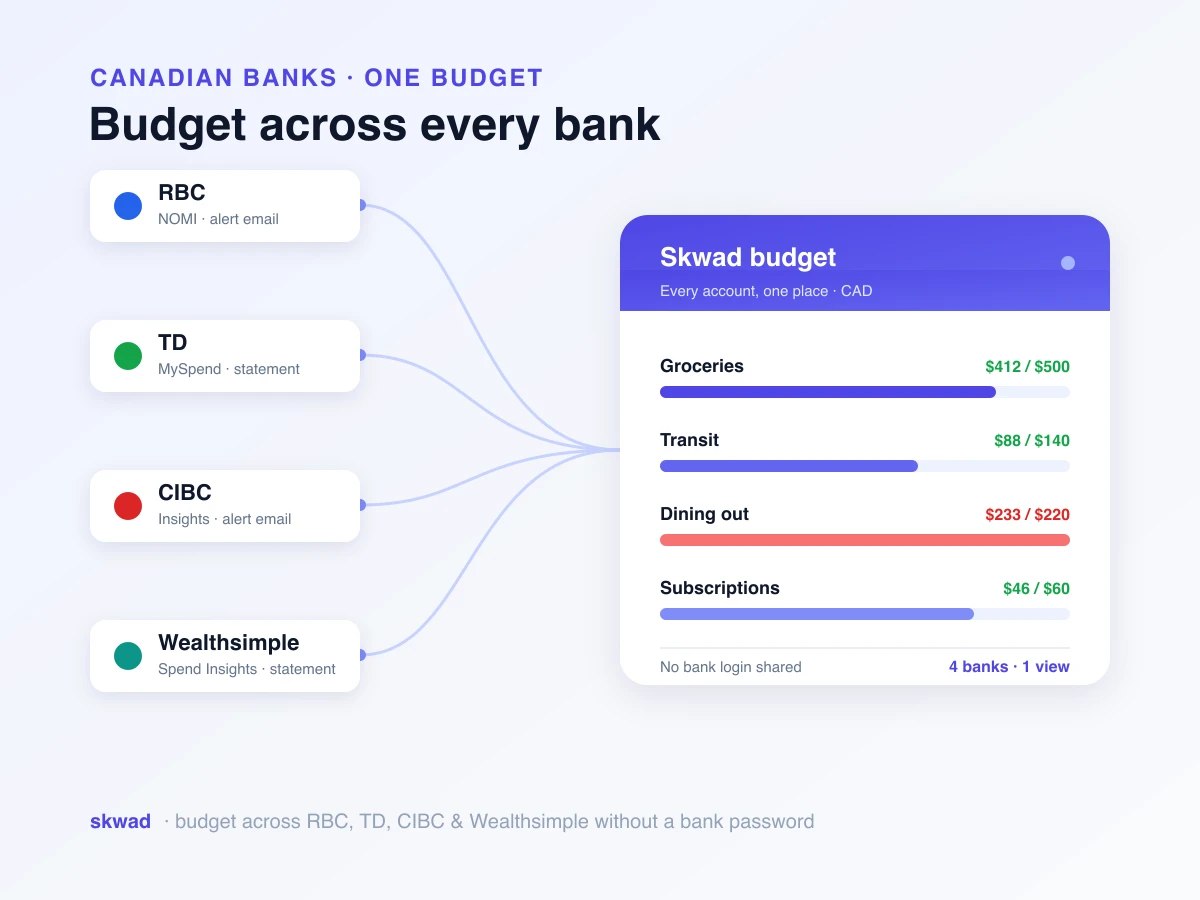
Rather than connecting directly to accounts, Skwad monitors your email inbox and parses through these alerts from banks and credit card providers. Skwad automatically extracts and categorizes each transaction detail from these email alerts, allowing you to maintain a unified, real-time financial feed without sharing private login credentials with any third party. It’s the same idea behind tracking spending without linking your bank. Your banking connections and personal information remain 100% private and secure.

Skwad: a safer alternative to traditional budgeting apps
We’ve covered the risks of handing your bank credentials to a third-party app. Skwad takes a different approach to personal finance, one that puts your security and privacy first.
How Skwad works
Skwad uses the bank alerts and email notifications you already receive to give you a full view of your finances, without ever needing access to your bank accounts. Here’s how it works:
-
Email forwarding: You set up email forwarding for your bank and credit card alerts to a unique Skwad email address.
-
AI-powered parsing: Skwad reads these emails and extracts relevant financial information.
-
Automatic categorization: Transactions are automatically categorized based on the information in the alerts.
-
Real-time updates: Your financial dashboard is updated in real time as new alerts come in.
The benefits of using Skwad
Because Skwad’s default approach never asks for your bank login, there’s no password sitting in a third party’s systems to be compromised in a breach. It doesn’t violate your bank’s terms of service either, so you keep the protection and liability coverage your financial institution offers. Your data stays private, since Skwad only processes the alerts you forward, and you control exactly what gets shared. It works with virtually any bank or credit card provider that sends transaction email alerts (see a list of the most popular banks people use with Skwad), and you get the same real-time updates as a traditional budgeting app, minus the security risk.
Making the switch to Skwad
Transitioning to Skwad is simple and secure. Here’s how to get started:
- Sign up for a Skwad account.
- Set up email forwarding for your bank and credit card alerts to your unique Skwad email address.
- Let Skwad do the rest, automatically categorizing your transactions and updating your financial dashboard.
Choosing Skwad gives you a secure, private, and compliant way to manage your finances. You get the benefits of a full financial management system without the worry that comes with sharing your sensitive banking information.
Data breaches and privacy concerns are only getting more common, so it matters that the tools you use put your security first. Skwad lets you stay on top of your finances without compromising your privacy or violating your bank’s terms of service.
The temptation to link accounts easily is high. However, directly sharing your bank password is the equivalent of writing it down on a piece of paper for anyone to access. It’s only as safe as the various apps and APIs it passes through.
By leaning on bank alerts instead of direct credential sharing, you get complete financial visibility and organization without the risk. Skwad puts you in full control of your money and keeps it private. If you’d rather never type a password into a third-party app at all, here’s how to budget without sharing your bank password.
Want a budgeting app that skips Plaid entirely? See why Skwad is a top budget app that works without bank linking.
Frequently asked questions
Is it safe to connect your bank account to a budgeting app?
It depends on how the app connects. Apps that ask for your online banking username and password create real risk, because sharing those credentials usually violates your bank’s terms of service and can shift liability for fraud onto you. Skwad avoids this entirely by reading the transaction alerts your bank already emails you, so your login never leaves your bank.
Does sharing my bank password void my fraud protection?
Often, yes. Most bank agreements state that you are liable for losses from voluntarily sharing your login credentials with a third party. If your credentials are compromised after you hand them to a budgeting app, you may have no recourse to recover the losses.
Is read-only access from a budgeting app safe?
Read-only access still means your credentials are stored by the app or its data aggregator so they can refresh your data. Those stored credentials can be exposed through a data breach or misuse. Skwad never stores bank credentials because it works from email alerts you choose to forward.
How does Skwad track transactions without my bank login?
Skwad monitors a private email address for the transaction and balance alerts your bank already sends. It extracts the merchant, date, and amount from each alert, categorizes it, and updates your dashboard in real time, all without ever asking for your bank password.